

Study Smarter, Save Time, and Boost Your Productivity
Updated for 2026
Let’s be honest—being a student today isn’t easy. Between assignments, exams, projects, presentations, and learning new skills, there’s always something demanding your time.
The good news? AI tools have become smarter than ever in 2026. Whether you want help understanding difficult concepts, creating presentations, solving math problems, writing essays, or organizing your notes, there’s an AI tool that can save you hours every week.
I’ve spent a lot of time exploring different AI tools while working on websites, studying new technologies, and creating content. One thing I’ve learned is that the best AI tool isn’t necessarily the most expensive one. In fact, many free tools are more than enough for most students.
In this guide, I’ll share the best free and paid AI tools for students in 2026, along with what they’re best at, their pros and cons, and who should use them.
—
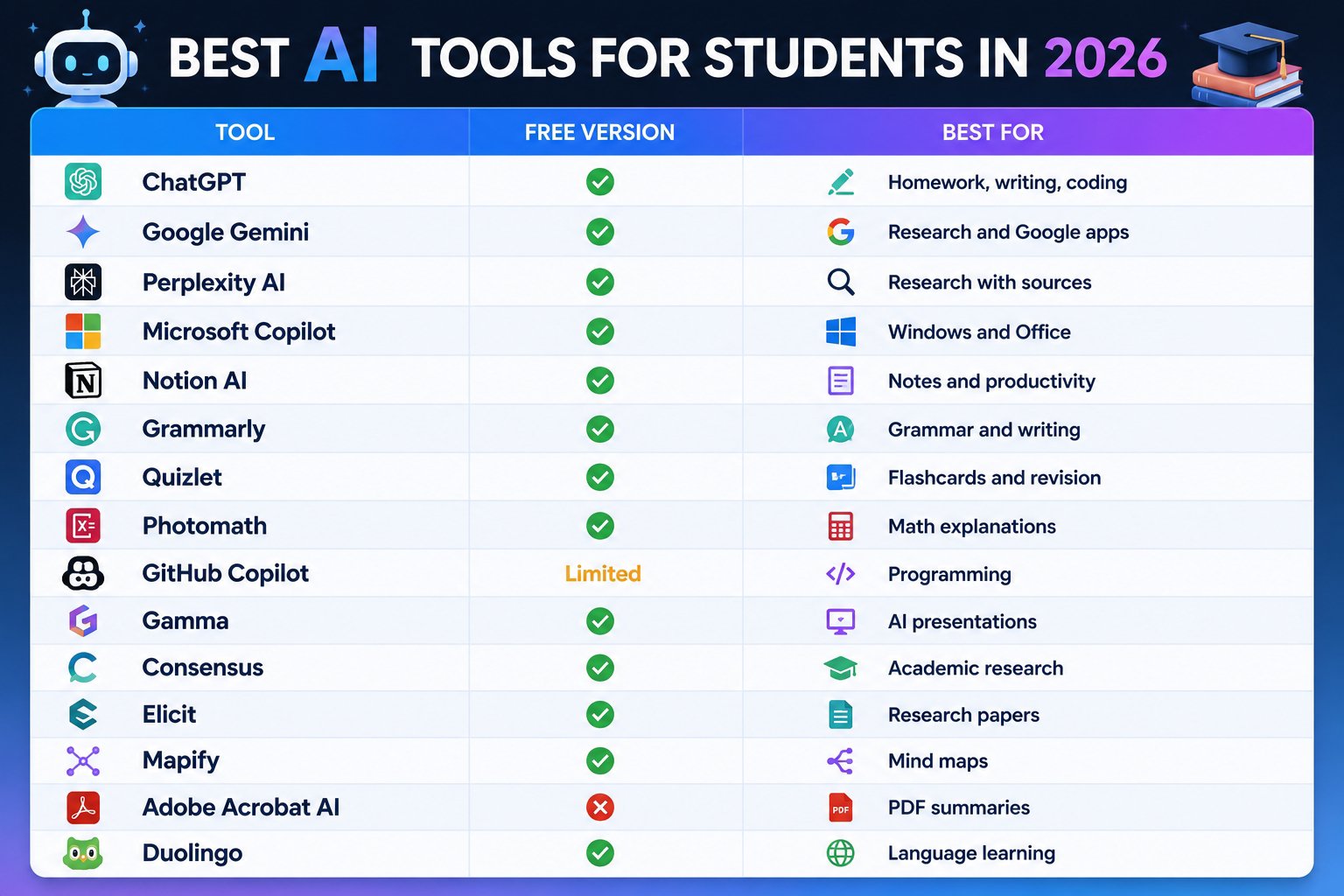
Quick Comparison Table
1. ChatGPT – The Best All-Round AI Assistant
Link: ChatGPT – https://chatgpt.com
If I could recommend just one AI tool to every student, ChatGPT would easily be my first choice.
It can explain difficult topics, solve coding problems, help write assignments, summarize chapters, create study plans, generate interview questions, and even prepare you for exams.
Best For
– Homework
– Coding
– Essay writing
– Brainstorming
– Exam preparation
Free Version
✅ Yes
Premium
ChatGPT Plus
—
2. Google Gemini – Best for Google Users
Link: Google Gemini – https://gemini.google.com
If you already use Gmail, Google Docs, Google Drive, or Android, Gemini fits perfectly into your daily workflow.
It can summarize documents, answer questions, help with research, and generate content quickly.
Best For
– Research
– Google Docs
– Gmail
– Study notes
Free Version: ✅ Available
—
3. Perplexity AI – Best Research Assistant
Link: Perplexity AI – https://www.perplexity.ai
Unlike many AI chatbots, Perplexity shows the sources it uses. This makes it especially useful for projects, reports, and academic work.
Instead of searching through multiple websites, you get summarized answers with references.
Best For
– School projects
– Research
– Fact checking
– Current information
Free Version: ✅ Yes
—
4. Microsoft Copilot
Link: Microsoft Copilot – https://copilot.microsoft.com
Perfect for students who use Windows and Microsoft Office.
Copilot helps write documents, create PowerPoint presentations, summarize PDFs, and answer questions directly inside Microsoft apps.
Best For:
– Word
– PowerPoint
– Excel
– Windows users
Free Version: ✅
—
5. Grammarly
Link: Grammarly – https://www.grammarly.com
Even the best writers make mistakes.
Grammarly checks grammar, spelling, punctuation, and sentence clarity. It also improves your writing style without changing your ideas.
Best For:
– Assignments
– Emails
– Reports
– Essays
Free Version: ✅
—
6. Notion AI
Link: Notion AI – https://www.notion.so/product/ai
If your study notes are scattered everywhere, Notion AI can organize everything in one place.
You can create study planners, manage projects, summarize notes, and even generate content.
Best For:
– Notes
– Productivity
– Daily planning
Free Version: ✅
—
7. Quizlet
Link: Quizlet – https://quizlet.com
Studying becomes much easier when information is turned into flashcards.
Quizlet uses AI to generate quizzes and study materials automatically.
Best For:
– Revision
– Flashcards
– Exam preparation
Free Version: ✅
—
8. Photomath
Link: Photomath – https://photomath.com
Photomath doesn’t just give answers—it explains every step.
It’s one of the best AI apps for learning mathematics.
Best For:
– Algebra
– Calculus
– Equations
– Homework
Free Version: ✅
—
9. GitHub Copilot
Link: GitHub Copilot – https://github.com/features/copilot
Learning programming?
GitHub Copilot can generate code, explain errors, complete functions, and help you understand programming concepts faster.
Best For:
– Python
– Java
– C++
– JavaScript
Free Trial: ✅
—
10. Gamma
Link: Gamma – https://gamma.app
Creating presentations manually takes time.
Gamma can generate beautiful presentations from just a short prompt.
Best For:
– School presentations
– College seminars
– Project slides
Free Version: ✅
—
11. Consensus
Link: Consensus – https://consensus.app
Consensus searches published research papers instead of random websites.
Perfect for college students who need trustworthy information.
Free Version: ✅
—
12. Elicit
Link: Elicit – https://elicit.com
Elicit helps summarize research papers, compare studies, and find relevant academic sources.
Ideal for university students and researchers.
Free Version: ✅
—
13. Mapify
Link: Mapify – https://mapify.so
Turn long notes or PDFs into colorful mind maps within seconds.
Perfect for visual learners.
Free Version: ✅
—
14. Adobe Acrobat AI
Upload a PDF and ask questions about it.
Instead of reading hundreds of pages, AI finds important information instantly.
Best For:
– PDFs
– Books
– Notes
Paid Tool
—
15. Duolingo AI
Link: Duolingo – https://www.duolingo.com
Want to learn a new language?
Duolingo now includes AI-powered conversations and personalized lessons.
Free Version: ✅
—

Free vs Paid AI Tools
Free Tools are Best If:
– You’re a school student.
– You use AI occasionally.
– You have a limited budget.
– You only need homework help.
Paid Tools are Worth It If:
– You’re in college.
– You write lots of reports.
– You code regularly.
– You create presentations often.
– You want faster responses and advanced features.
—
My Recommendation
If you’re just starting out, don’t rush into buying subscriptions.
I would begin with ChatGPT, Google Gemini, Perplexity AI, Grammarly, and Quizlet. These five tools cover almost everything a student needs, and their free versions are surprisingly capable.
As your needs grow, you can decide whether a paid plan is worth it.
—
Frequently Asked Questions
Which AI tool is best for homework?
ChatGPT is one of the best choices because it explains concepts instead of only giving answers.
Which AI is best for research?
Perplexity AI and Consensus are excellent because they provide source-backed information.
Is ChatGPT free?
Yes. ChatGPT offers a free version, with an optional Plus subscription for additional features.
Which AI is best for coding?
GitHub Copilot and ChatGPT are both strong options for learning and writing code.
Can AI replace studying?
No. AI should be used as a learning assistant, not as a replacement for understanding the material yourself.
—
Final Thoughts
AI is changing the way students learn, but the smartest approach is to use it responsibly. Think of these tools as study partners that can explain difficult topics, organize information, and save time—not as shortcuts that do all the work for you.
If you learn how to use AI effectively, you’ll spend less time searching for answers and more time understanding them. That balance can make studying more productive, enjoyable, and efficient throughout 2026 and beyond.
Which AI tool is your favorite? Let us know in the comments and share this guide with your friends if you found it helpful!
Artificial Intelligence is transforming the way we learn, work, and solve everyday problems. Whether you’re a student looking to complete assignments faster, improve your writing, conduct research, or a business owner aiming to automate workflows, create content, analyze data, and boost productivity, the right AI tools can save hours of work while improving results. From AI writing assistants and image generators to coding companions, presentation makers, research platforms, and automation software, today’s AI solutions make complex tasks simpler and more efficient.
In this comprehensive guide, we’ve handpicked the 25 best AI tools for business professionals, entrepreneurs, freelancers, developers, content creators, and students. Each tool has been selected based on its features, ease of use, pricing, reliability, and real-world usefulness. Whether you’re searching for free AI tools, ChatGPT alternatives, AI tools for studying, AI productivity apps, or business automation software, this list will help you discover the best options available in 2026.