
Have you uploaded your website icon, but it only appears in your browser tab and not in Google Search? You’re not alone.
Many website owners face this issue. The good news is that it’s usually easy to fix. In this guide, you’ll learn how to properly add a favicon, why it may not appear in search results, and what you can do to speed up the process.
What Is a Favicon?
A favicon (also called a site icon) is the small image that appears:
- In your browser tab
- In bookmarks
- In browser history
- Sometimes next to your website in Google Search results
A favicon helps users recognize your website and builds trust in your brand.
How to Add a Favicon in an HTML Website
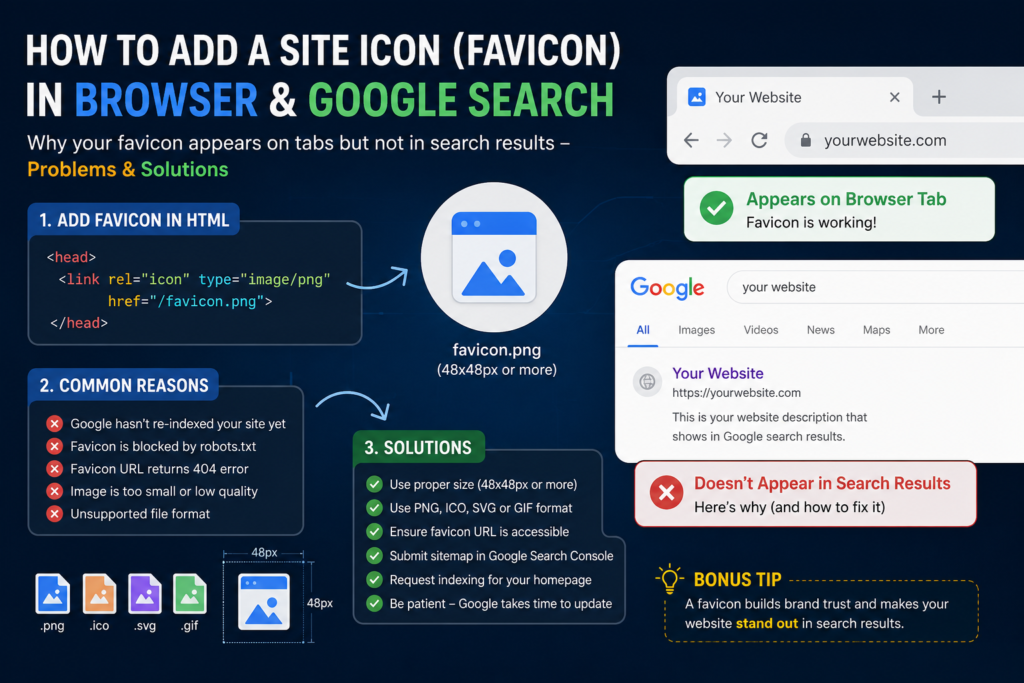
Place your favicon file (preferably favicon.ico or favicon.png) in your website’s root folder and add this code inside the <head> section of every page:
<link rel="icon" type="image/png" href="/favicon.png">
Or if you’re using an ICO file:
<link rel="icon" href="/favicon.ico">
Why Your Favicon Appears in the Browser but Not in Google Search
This is one of the most common questions.
Just because your favicon appears in the browser doesn’t mean Google will show it immediately. Google has to crawl your website again before updating search results.
Other common reasons include:
- The favicon is blocked by
robots.txt. - The image is too small or low quality.
- The favicon URL returns an error (404).
- Google hasn’t re-indexed your website yet.
- The favicon isn’t a supported format.
Google Favicon Best Practices
For the best chance of appearing in search results:
- Use a square image (at least 48 × 48 pixels).
- Keep the icon simple and easy to recognize.
- Use PNG, ICO, SVG, or GIF formats.
- Make sure the favicon URL is publicly accessible.
- Don’t frequently change the favicon.
How to Check if Google Can Access Your Favicon
Open your favicon directly in a browser.
For example:
https://yourwebsite.com/favicon.png
or
https://yourwebsite.com/favicon.ico
If it doesn’t load, Google won’t be able to use it.
How to Make It Appear Faster
While you can’t force Google to update immediately, you can help by:
- Verifying your website in Google Search Console.
- Requesting indexing for your homepage.
- Updating your sitemap.
- Waiting for Google to recrawl your website.
Google may take anywhere from a few days to several weeks to update your favicon in search results.
Frequently Asked Questions
How long does it take for a favicon to appear in Google Search?
Usually between a few days and several weeks, depending on when Google crawls your website.
Does clearing my browser cache help?
It only affects what you see locally. It does not change Google’s search results.
Can I use a PNG instead of an ICO file?
Yes. Google supports PNG, ICO, SVG, and GIF favicons.
My favicon was updated, but Google still shows the old one.
Google may have cached the previous version. Keep the new favicon live and wait for Google to recrawl your site.
Final Thoughts
A favicon may seem like a small detail, but it plays an important role in branding and user trust. If your icon appears in the browser but not in Google Search, don’t panic. In most cases, the issue is simply that Google hasn’t updated its index yet. Follow the best practices above, keep your favicon accessible, and give Google a little time.
A properly configured favicon is a small improvement that makes your website look more professional across browsers and search results.